
The toolbox
Termius
Cross-platform cloud vault, port forwarding, SFTP, Mosh, a usable free tier, and 18,908 ratings. If the question is a general SSH client for a team, start here. SSHHIP is not trying to replace it.
Dated list · 2026-08-25
There is no best. Moshi and other 2026 roundups still write as if there were. This page is the jobs, with primary sources. SSHHIP's documented edges are out-of-band multiplexer control and keyboardless Command Dial control. Pair pages sit under each name.
The toolbox
Cross-platform cloud vault, port forwarding, SFTP, Mosh, a usable free tier, and 18,908 ratings. If the question is a general SSH client for a team, start here. SSHHIP is not trying to replace it.
Files.app
Servers in Files, offline folders, Shortcuts, widgets, Handoff, and a Mac app. Same $29.99 lifetime ballpark as SSHHIP. If the daily need is remote files from iOS, ShellFish is the better buy.
Mosh and power-user SSH
Open-source Mosh, tunnels, ProxyCommand, ssh-agent, SFTP Files provider, and authored themes. SSHHIP has Mosh with SSH fallback, but no forwarding. Blink wins that axis on purpose.
Agent chrome and notifications
Mosh, a kanban, diffs, Watch and Live Activity approvals, tmux window and herdr tab jumps. A vendor service sits in the notification path. SSHHIP cannot tell you anything while it is closed, by design.
The classic Panic terminal
Mosh, Eternal Terminal, GPU text, clips, jump hosts, Panic Sync, Mac and visionOS. Prompt is the general terminal SSHHIP is worse at. SSHHIP's documented edges are out-of-band mux control and a Command Dial that keeps most of that work off the software keyboard.
Multiplexer control without stdin
Out-of-band multiplexer control so commands never become the agent's stdin. Keyboardless Command Dial for those actions, common keys, snippets, and voice. No forwarding, no Files provider, no free tier, iPhone and iPad only.
Control surface
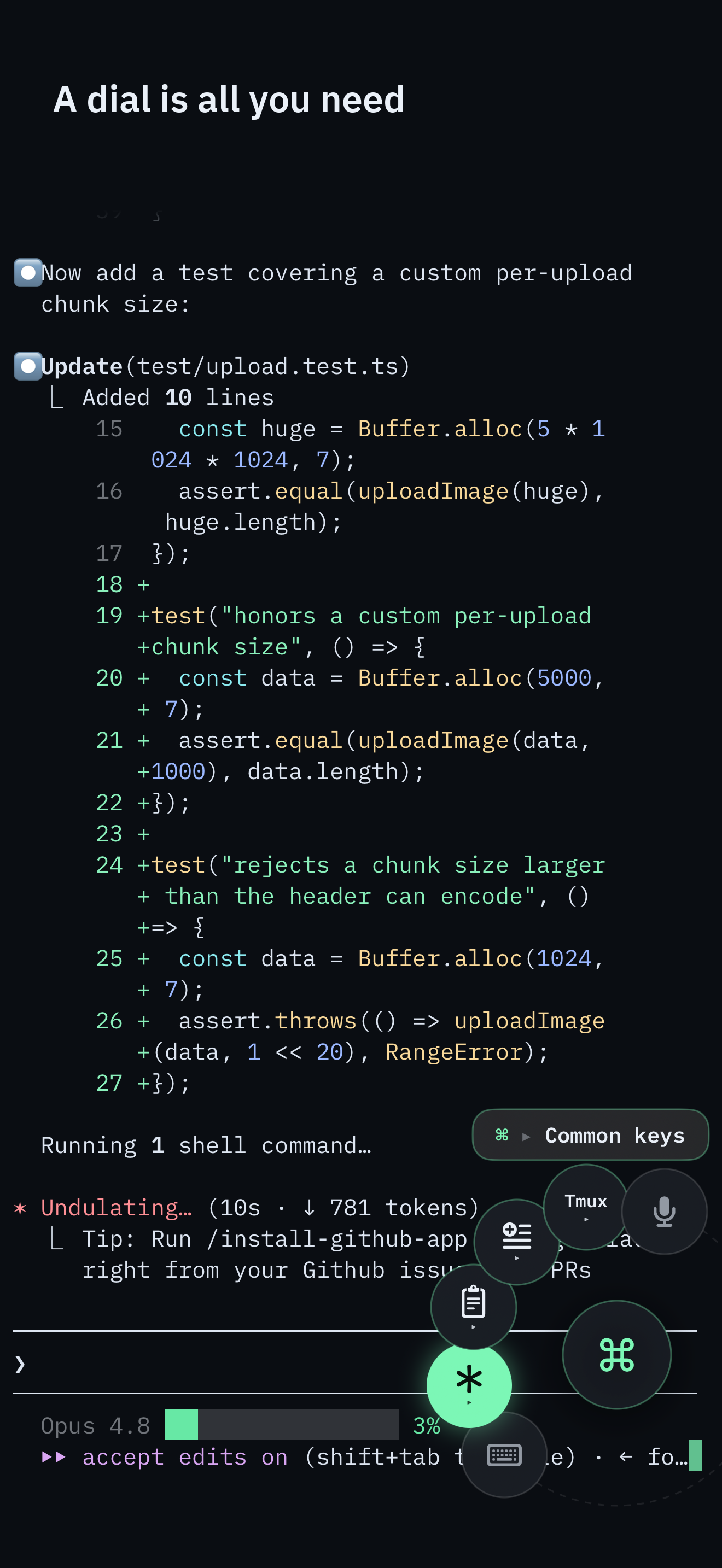
The Command Dial is the whole control surface: multiplexer actions, common keys, pane focus, snippets, voice, and Send Image. The software keyboard appears only when you pick Keyboard.
Typing a long command still needs Keyboard or Voice. The full command palette remains one puck-tap away.
| Capability | SSHHIP | Termius | ShellFish | Blink | Moshi | Prompt |
|---|---|---|---|---|---|---|
| Price model | Full access for one month, then a $29.99 one-time lifetime unlock | Free tier, then Pro from $10/user/mo billed annually on the web (App Store IAP lists $15.00/mo and $119.00/yr) | Free with ads, or $2.99/mo, $14.99/yr, or $29.99 Lifetime Pro Unlock | Two weeks free, then Blink+ at $19.99/year (Build add-ons priced separately) | Free tier, then $7.99/mo, $69.99/yr, or a $249.00 lifetime unlock | 7-day trial, then $9.99/year or a $49.99 one-time purchase (four platforms) |
| Vendor backend | None. No SSHHIP account, relay, or cloud vault | Personal or team cloud vault with cross-device sync | No vendor vault required; sync uses your own iCloud | No vendor vault for core SSH; Build add-ons use Blink infrastructure | Vendor service participates in the notification and agent-tracking path | Panic Sync for servers, keys, passwords, and clips |
| Out-of-band multiplexer control | Yes - separate SSH exec channel, never the interactive PTY | Not documented - no separate control surface found on the linked page | Not documented. The tmux help describes attaching, not exec-channel control | Not documented - no separate control surface found on the linked page | Not described as a separate exec channel, but it does jump directly to a window or tab | Not documented - Prompt's tmux story is emulation accuracy, not an exec channel |
| Keyboardless control | Yes - Command Dial for mux actions, keys, snippets, and voice | Not documented - no equivalent radial or one-handed control surface found on the linked page | Not documented - tmux help covers tap-to-attach thumbnails, not in-session control without the keyboard | No - customizable hardware and software keyboard is the documented control surface | Limited - tap to jump to a tmux window or herdr tab; no documented radial control for keys or mux actions | No - a customizable iOS keyboard is the documented iOS control surface |
| tmux support | Attach + out-of-band control, focus pad, session picker | Works as a terminal; no documented tmux control surface | Built-in: session thumbnails, tap to attach, Handoff between devices | Works as a full terminal; no documented tmux control surface | Yes - jump straight to any tmux window | Improved emulation for tmux and neovim; no documented control surface |
| herdr support | First-class attach + control, plus a live Agent Map of workspaces, tabs, and agent status | Not documented | Not documented | Not documented | Yes - jump straight to any herdr tab | Not documented |
| Mosh (iOS App Store build) | Yes - every host. Automatic tries Mosh first and falls back to SSH | Yes - the iOS changelog documents Mosh connections | Not documented on the site, help index, or App Store listing | Yes - Mosh is a headline feature | Yes - Mosh is in the app name and the headline feature | Yes - Mosh and Eternal Terminal are headline connection types |
| Port forwarding | No | Yes - listed in the free Starter tier | Not documented on the site, help index, or App Store listing | Yes - tunnels (-L), ProxyCommand, ssh-agent | Pro-only automatic HTTP dev-server preview tunneled over SSH, not general-purpose -L forwarding | Yes - Port Forwarding is a first-class connection type |
| SFTP browser / Files | No browser or Files provider. Send Image upload only | Yes - SFTP in the free tier | Full Files.app provider with offline folders and Quick Upload | Yes - SFTP with a Files.app provider | Repo file browser at any commit; no Files.app provider documented | Not documented in Prompt. Panic's SFTP client is Transmit |
| Terminal themes | 18 built-in themes including Rosé Pine; no custom or user-authored themes | Yes - theme picker per host | Customisable theme | User-authored themes, installable from a URL | 573 themes | Built-in themes plus custom themes you can create or import |
| Terminal font size | Adjustable 10-24 pt (default 14) | Adjustable - font, size, and pinch-to-zoom | Fonts are customisable; terminal font size specifically is not documented | Custom fonts and sizes, installable from a URL | Terminal font and font size are selectable | Font family and default font size are adjustable |
| Cross-platform | iPhone + iPad only | iOS, Android, macOS, Windows, Linux | iPhone, iPad, Mac | Apple platforms only | iOS and Android | iPhone, iPad, Mac, visionOS |
| Download size | 16.6 MB (iOS 1.34.7) | 233.9 MB (iOS 7.6.0) | 116.9 MB (iOS 2026.26) | 230.0 MB (iOS 18.6.3) | 78.6 MB (iOS 3.12.1) | 42.8 MiB (iOS 3.5.2) |
| Min iOS | 17.0 | 17.0 | 17.4 | 17.6 | 18.0 | 17.0 |
| Ratings (as of verify date) | 1 rating · 5.00★ | 18,908 ratings · 4.70★ | 1,465 ratings · 4.82★ | 415 ratings · 3.10★ | 453 ratings · 4.72★ | 349 ratings · 4.32★ |
SSHHIP cells checked against repository source 1.24.0 (App Store build 1.34.7) on 2026-09-29. Prompt cells checked 2026-08-14. Other competitor cells checked 2026-08-12 against the vendor pages and Apple lookup data cited on each pair page. "Not documented" means the capability was not found on the pages linked there, which is weaker than "No". Re-check before relying on a cell.
Every one of those is a reason to buy something else. Most of the apps above are older, larger, and more capable than SSHHIP on raw feature count. No other client compared here documents an equivalent to SSHHIP's separate-channel mechanism for multiplexer commands, or a Command Dial that keeps most of that work off the software keyboard.
SSHHIP is a native iPhone and iPad SSH client with out-of-band multiplexer control and keyboardless Command Dial control. Termius is the category's broad, cross-platform, cloud-vault incumbent.
SSHHIP wins on multiplexer control architecture and keyboardless Command Dial control. Secure ShellFish wins Apple platform integration. Both are Apple-only with a $29.99 lifetime unlock.
SSHHIP is a native, touch-first client that controls the multiplexer from outside the PTY, mostly from the Command Dial. Blink is an open-source power-user terminal with Mosh, tunnels, and total keyboard customisation.
SSHHIP is the minimal agent-oriented terminal: no vendor backend, out-of-band mux control, and a Command Dial so most of that work never needs the software keyboard. Moshi is the feature-maximal one, with a vendor service behind its notifications.
SSHHIP is an iOS-only multiplexer-control client: out-of-band mux commands, no vendor sync, and a Command Dial so most of that work never needs the software keyboard. Prompt 3 is Panic's general-purpose terminal across iPhone, iPad, Mac, and visionOS, with a customizable iOS keyboard.
Full access for one month, then a $29.99 lifetime unlock. No account. No SSHHIP backend.